


Software for operating BCS brand CCTV devices.
It was created to operate devices from many product lines with one application. Today it is already advanced software that can be used by both individual users and large monitoring centers. The application is characterized by ease and intuitiveness of use and the implementation of many functions that extend the daily work of the operator.
.png)
Features and functionalities
| BCSM - Single station | BCSM - Server client | BCS-F-NVR7004/08 | BCS-F-NVR3504/08 | BCSM - Lite - Logistics | BCS-F-NVR5005-Lite | |
|---|---|---|---|---|---|---|
| Camera Support | ✓ | ✓ | ✓ | ✓ | ✓ | ✓ |
| BCS Cameras | All | All | All | All | All | All |
| Dahua HIK UNV ONVIF Cameras | License | ✓ | License | License | ✓ | ✓ |
| Recorder Support | ✓ | ✓ | — | — | ✓ | — |
| BCS Recorders | All | ✓ | — | — | Only F-NVR5005-2U | — |
| Dahua HIK UNV Recorders | License | ✓ | — | — | — | — |
| Pulson Alarm control panels | ✓ | ✓ | ✓ | ✓ | — | — |
| Satel control panels | License | License | ✓ | ✓ | — | — |
| PolonAlfa fire alarm panels (modbus) | License | License | License | License | License | — |
| Siemens fire alarm panels (bacnet) | License | License | License | License | License | — |
| Modbus Support | ✓ | ✓ | ✓ | ✓ | ✓ | — |
| POS Support | License | ✓ | ✓ | ✓ | ✓ | ✓ |
| Software RAID Support | — | — | ✓ | ✓ | — | ✓ |
| Hardware RAID Support | — | — | ✓ | ✓ | — | ✓ |
| BCSM - Single station | BCSM - Server client | BCS-F-NVR7004/08 | BCS-F-NVR3504/08 | BCSM - Lite - Logistics | BCS-F-NVR5005-Lite | |
|---|---|---|---|---|---|---|
| View card | up to 64 per card | up to 64 per card | up to 64 per card | up to 36 per card | up to 64 per card | up to 64 per card |
| Number of view cards | Unlimited | Unlimited | 2 | 2 | 4 | 2 |
| Multiple monitor support | up to 8 | up to 8 | up to 1 | up to 1 | up to 4 | up to 1 |
| Live sequence
×
Automatic display of cameras in 1 or 4 window layout, with smooth view switching at specified intervals. Configuration is done from the main menu - it is possible to select current view or saved views. Click "Perform action for all channels". Operation: Sequence is started. Cameras change automatically according to configuration. It can be stopped, restarted, go to next or previous. |
✓ | ✓ | ✓ | ✓ | — | — |
| Synchronous playback
×
Function allows simultaneous playback of recordings from all cameras displayed in live view. Clicking the "Synchronous QP" button starts playback of recordings from the time specified in settings - in all active view windows. Operating conditions: Operation: User can quickly check recordings from several cameras simultaneously. All streams play synchronously relative to the set time. |
— | — | ✓ | ✓ | — | ✓ |
| Playback in view
×
Enables playback of recordings directly in the view window in the "Live View" tab, without switching to the "Playback" tab. Operation: User can view recordings without leaving the "Live View" tab. |
✓ | ✓ | ✓ | ✓ | ✓ | ✓ |
| Automatic view mode
×
Streams in the view area are masked by default. User selects time interval after which view disappears if no further motion is detected. Automatic view mode can also be manually disabled. Operation: Camera displays image only when motion is detected. After set time without motion, view is masked again. |
✓ | ✓ | — | — | — | — |
| Alarm queuing
×
Alarm queuing - function of displaying streams in "Live View" based on events received from devices. Alarm events must be configured in devices. Enabling function: System behavior: Operation: System automatically switches to images from cameras associated with subsequent alarms, according to their arrival order. |
✓ | ✓ | — | — | — | — |
| Control of device alarm outputs
×
Control of alarm outputs - function enables management of alarm outputs of devices that are equipped with them. Activation: Deactivation: Operation: After output activation - device triggers alarm (e.g. sound signal, light signal or other programmed action). Deactivation ends alarm. |
✓ | ✓ | ✓ | ✓ | ✓ | ✓ |
| Views in preview
×
Function allows creating and saving views and quick calling of layout and displaying image from devices. View saves position and settings of streams from cameras added to workspace. Saved views can be used e.g. in live sequence configuration. Operation: User can easily select one of previously configured camera layouts. Views are saved, ready for quick display or use in other functions. |
✓ | ✓ | ✓ | ✓ | ✓ | ✓ |
| PTZ Control | ✓ | ✓ | ✓ | ✓ | ✓ | ✓ |
| Fisheye dewarping | ✓ | ✓ | ✓ | ✓ | ✓ | ✓ |
| IVS rules display | ✓ | ✓ | ✓ | ✓ | ✓ | — |
| Automatic view tasks
×
Function allows running tasks created in "Routes and Tasks" module. Each task consists of sequences, and sequences - of saved views assigned to view windows. After clicking "Run task" button, list of available tasks appears. Running occurs after selecting one of them. Operation: Selected camera layout starts displaying automatically according to configuration assigned to task. Button changes to "Stop task". |
✓ | ✓ | — | — | — | — |
| On-demand recording of view stream | ✓ | ✓ | — | — | — | — |
| Two-way Audio | ✓ | ✓ | ✓ | ✓ | — | — |
| View card | up to 64 per card | up to 64 per card | up to 64 per card | up to 36 per card | up to 64 per card | up to 64 per card |
| BCSM - Single station | BCSM - Server client | BCS-F-NVR7004/08 | BCS-F-NVR3504/08 | BCSM - Lite - Logistics | BCS-F-NVR5005-Lite | |
|---|---|---|---|---|---|---|
| Playback max | up to 64 per card | up to 64 per card | up to 36 per card | up to 36 per card | up to 64 per card | up to 36 per card |
| Synchronous playback | — | — | ✓ | ✓ | ✓ | ✓ |
| Single channel acceleration | x8 | x8 | x128 | x128 | x128 | x128 |
| Synchronous acceleration | — | — | ✓ | ✓ | ✓ | ✓ |
| Local playback | ✓ | ✓ | ✓ | ✓ | ✓ | ✓ |
| Remote playback | ✓ | ✓ | — | — | — | — |
| MicroSD card playback | ✓ | ✓ | — | — | — | — |
| Calendar zoom | — | — | ✓ | ✓ | ✓ | ✓ |
| Fisheye dewarping | ✓ | ✓ | ✓ | ✓ | ✓ | ✓ |
| Photo browser | ✓ | ✓ | ✓ | ✓ | ✓ | ✓ |
| BCSM - Single station | BCSM - Server client | BCS-F-NVR7004/08 | BCS-F-NVR3504/08 | BCSM - Lite - Logistics | BCS-F-NVR5005-Lite | |
|---|---|---|---|---|---|---|
| Number of recorded channels | — | — | 70 | 35 | — | 50 |
| Supported encoding | — | — | H.265 / H.264 | H.265 / H.264 | — | H.264 |
| Second stream recording | — | — | ✓ | ✓ | — | ✓ |
| Event recording | ✓ | ✓ | ✓ | ✓ | — | — |
| Alarm input recording | ✓ | ✓ | ✓ | ✓ | — | — |
| AI alarm recording | ✓ | ✓ | ✓ | ✓ | — | — |
| Bulk Download
×
Function enables automatic downloading of recordings from multiple devices at set times. User defines time ranges from which recordings should be downloaded. Example: We can set daily downloading of recordings from recorder, from two cameras directed at main office entrance, between 08:30 and 09:30, i.e. during employee arrival time. There is also option for one-time downloading of material from multiple devices - e.g. for trial fire evacuation. |
✓ | ✓ | — | — | — | — |
| Background photos
×
Function allows cyclic taking of photos from selected cameras in set time interval. Can set: Ideal for documenting fixed view or long-term changes in environment. |
✓ | ✓ | ✓ | ✓ | — | — |
| Recording encryption | — | — | — | — | — | — |
| Player for protected recordings | ✓ | ✓ | ✓ | ✓ | ✓ | ✓ |
| Conversion to AVI | ✓ | ✓ | ✓ | ✓ | ✓ | ✓ |
| BCSM - Single station | BCSM - Server client | BCS-F-NVR7004/08 | BCS-F-NVR3504/08 | BCSM - Lite - Logistics | BCS-F-NVR5005-Lite | |
|---|---|---|---|---|---|---|
| Motion Detection | ✓ | ✓ | ✓ | ✓ | ✓ | ✓ |
| Intelligent alarms | ✓ | ✓ | ✓ | ✓ | ✓ | ✓ |
| License Plate Recognition | ✓ | ✓ | — | — | ✓ | — |
| Heat map (BCS LINE) | — | — | ✓ | ✓ | — | — |
| People counting (BCS LINE) | — | — | ✓ | ✓ | — | — |
| BCSM - Single station | BCSM - Server client | BCS-F-NVR7004/08 | BCS-F-NVR3504/08 | BCSM - Lite - Logistics | BCS-F-NVR5005-Lite | |
|---|---|---|---|---|---|---|
| Open street map | ✓ | ✓ | — | — | — | — |
| IVS, MD, input alarm handling | ✓ | ✓ | ✓ | ✓ | ✓ | — |
| Fire alarm panel alarm handling | — | — | ✓ | ✓ | ✓ | — |
| Camera image preview | ✓ | ✓ | ✓ | ✓ | ✓ | ✓ |
| BCSM - Single station | BCSM - Server client | BCS-F-NVR7004/08 | BCS-F-NVR3504/08 | BCSM - Lite - Logistics | BCS-F-NVR5005-Lite | |
|---|---|---|---|---|---|---|
| Video alarms | ✓ | ✓ | ✓ | ✓ | ✓ | ✓ |
| MODBUS alarms | ✓ | ✓ | ✓ | ✓ | — | — |
| Security system alarms | ✓ | ✓ | ✓ | ✓ | — | — |
| Fire alarms | License | License | License | License | License | — |
| AI alarm verification | — | — | ✓ | ✓ | — | — |
| BCSM - Single station | BCSM - Server client | BCS-F-NVR7004/08 | BCS-F-NVR3504/08 | BCSM - Lite - Logistics | BCS-F-NVR5005-Lite | |
|---|---|---|---|---|---|---|
| Forcom | — | — | — | — | License | License |
| S4H | ✓ | ✓ | ✓ | ✓ | ✓ | ✓ |
| Novitus | ✓ | ✓ | ✓ | ✓ | ✓ | ✓ |
| POSNET | ✓ | ✓ | ✓ | ✓ | ✓ | ✓ |
| Elzab | ✓ | ✓ | ✓ | ✓ | ✓ | ✓ |
| Text | ✓ | ✓ | ✓ | ✓ | ✓ | ✓ |
| QR scanners | ✓ | ✓ | ✓ | ✓ | ✓ | ✓ |
| Reaction to keywords | ✓ | ✓ | ✓ | ✓ | ✓ | ✓ |
| BCSM - Single station | BCSM - Server client | BCS-F-NVR7004/08 | BCS-F-NVR3504/08 | BCSM - Lite - Logistics | BCS-F-NVR5005-Lite | |
|---|---|---|---|---|---|---|
| Line crossing | — | — | ✓ | ✓ | — | — |
| Object removal | — | — | ✓ | ✓ | — | — |
| Object detection | — | — | ✓ | ✓ | — | — |
| Face detection | — | — | ✓ | ✓ | — | ✓ |
| BCSM - Single station | BCSM - Server client | BCS-F-NVR7004/08 | BCS-F-NVR3504/08 | BCSM - Lite - Logistics | BCS-F-NVR5005-Lite | |
|---|---|---|---|---|---|---|
| LPR camera support
×
System supports advanced LPR cameras assigned to different roles: Entrance, Exit, Gate, Intermediate, Auxiliary. Operation: Cameras recognize license plates and assign events to route points. Camera role affects event interpretation in system. |
✓ | ✓ | — | — | ✓ | — |
| White list support
×
White list contains registration numbers authorized to enter premises. List is synchronized between cameras and system. Operation: Authorization causes automatic activation of relay in camera (e.g. to open gate). In Reports, numbers not on list can be marked as temporarily authorized until their exit. |
✓ | ✓ | — | — | ✓ | — |
| Scale support (testing required) | ✓ | ✓ | — | — | — | — |
| Exit confirmation
×
System monitors vehicle exits and automatically ends route after license plate recognition by last route camera. Operation: Confirmation can be automatic or manual. System generates alarms if exit is not registered within specified time. |
✓ | ✓ | — | — | — | — |
| Presence on premises (route)
×
Module serves to monitor vehicle presence on premises and their routes. Operation: Route starts from license plate recognition by "entrance" camera, and ends on "exit" camera. System generates alarms in case of irregularities, e.g. missing license plate, exceeded stay time, vehicle change. |
✓ | ✓ | — | — | — | — |
| Additional photos from LPR
×
System enables automatic photo taking in response to events from LPR cameras. Operation: Photos are saved locally and visible in reports. They can also be sent by email after configuring appropriate alarm rules and reports. |
✓ | ✓ | — | — | — | — |
| BCSM - Single station | BCSM - Server client | BCS-F-NVR7004/08 | BCS-F-NVR3504/08 | BCSM - Lite - Logistics | BCS-F-NVR5005-Lite | |
|---|---|---|---|---|---|---|
| Alarm server | — | ✓ | — | — | — | — |
| BCSM - Single station | BCSM - Server client | BCS-F-NVR7004/08 | BCS-F-NVR3504/08 | BCSM - Lite - Logistics | BCS-F-NVR5005-Lite | |
|---|---|---|---|---|---|---|
| Video tours | ✓ | ✓ | — | — | — | — |
| BCSM - Single station | BCSM - Server client | BCS-F-NVR7004/08 | BCS-F-NVR3504/08 | BCSM - Lite - Logistics | BCS-F-NVR5005-Lite | |
|---|---|---|---|---|---|---|
| Number of users | 250 | Unlimited | 512 | 512 | 512 | 4 |
| Linux | ✓ | ✓ | ✓ | ✓ | ✓ | ✓ |
| Windows 10 / 11 | ✓ | ✓ | — | — | — | — |
| Remote permission granting | — | ✓ | — | — | — | — |
| Active Directory support | ✓ | ✓ | — | — | — | — |
| English | ✓ | ✓ | ✓ | ✓ | ✓ | ✓ |
| Polish | ✓ | ✓ | ✓ | ✓ | ✓ | ✓ |
| Czech | ✓ | ✓ | ✓ | ✓ | ✓ | ✓ |
| Slovak | ✓ | ✓ | ✓ | ✓ | ✓ | ✓ |
| Ukrainian | ✓ | ✓ | ✓ | ✓ | ✓ | ✓ |
| Lithuanian | ✓ | ✓ | ✓ | ✓ | ✓ | ✓ |
| Possibility of translation to other languages | ✓ | ✓ | ✓ | ✓ | ✓ | ✓ |
| Installation possibility | BCS-F-Station | BCS-F-Station | ✓ | ✓ | BCS-F-Station | ✓ |
| BCSM - Single station | BCSM - Server client | BCS-F-NVR7004/08 | BCS-F-NVR3504/08 | BCSM - Lite - Logistics | BCS-F-NVR5005-Lite | |
|---|---|---|---|---|---|---|
| VNC | — | — | ✓ | ✓ | — | — |
| DWSerwis | — | — | ✓ | ✓ | ✓ | ✓ |
| BCS One mobile application | — | — | ✓ | ✓ | — | — |
| BCSM - Master / KS | — | — | ✓ | ✓ | — | — |
| BCSM - Single station | BCSM - Server client | BCS-F-NVR7004/08 | BCS-F-NVR3504/08 | BCSM - Lite - Logistics | BCS-F-NVR5005-Lite | |
|---|---|---|---|---|---|---|
| Single monitoring station | ✓ | ✓ | — | — | ✓ | — |
| Monitoring station device server | ✓ | ✓ | — | — | — | — |
| Monitoring station (server client) | — | ✓ | — | — | — | — |
| Distribution center / warehouses | ✓ | ✓ | ✓ | ✓ | ✓ | ✓ |
| Stores Hotels | ✓ | ✓ | ✓ | ✓ | — | — |
| Gas stations | ✓ | ✓ | ✓ | ✓ | — | — |
| Object networks with central monitoring | ✓ | ✓ | — | — | — | — |
| Perimeter protection of objects | ✓ | ✓ | ✓ | ✓ | ✓ | — |
| Office / reception | ✓ | — | ✓ | ✓ | — | — |
| Housing estate monitoring | ✓ | — | ✓ | ✓ | — | — |
| MSRP price: | Free | License | BCS-F-NVR7004 - 10 105 PLN (up to 4 HDD) BCS-F-NVR7008 - 12 245 PLN (up to 8 HDD) |
BCS-F-NVR3504 - 8 605 PLN (up to 4 HDD) BCS-F-NVR3508 - 10 500 PLN (up to 8 HDD) |
||
| Software / hardware | Software | Software | Software & hardware | Software & hardware | Software & hardware | Software & hardware |

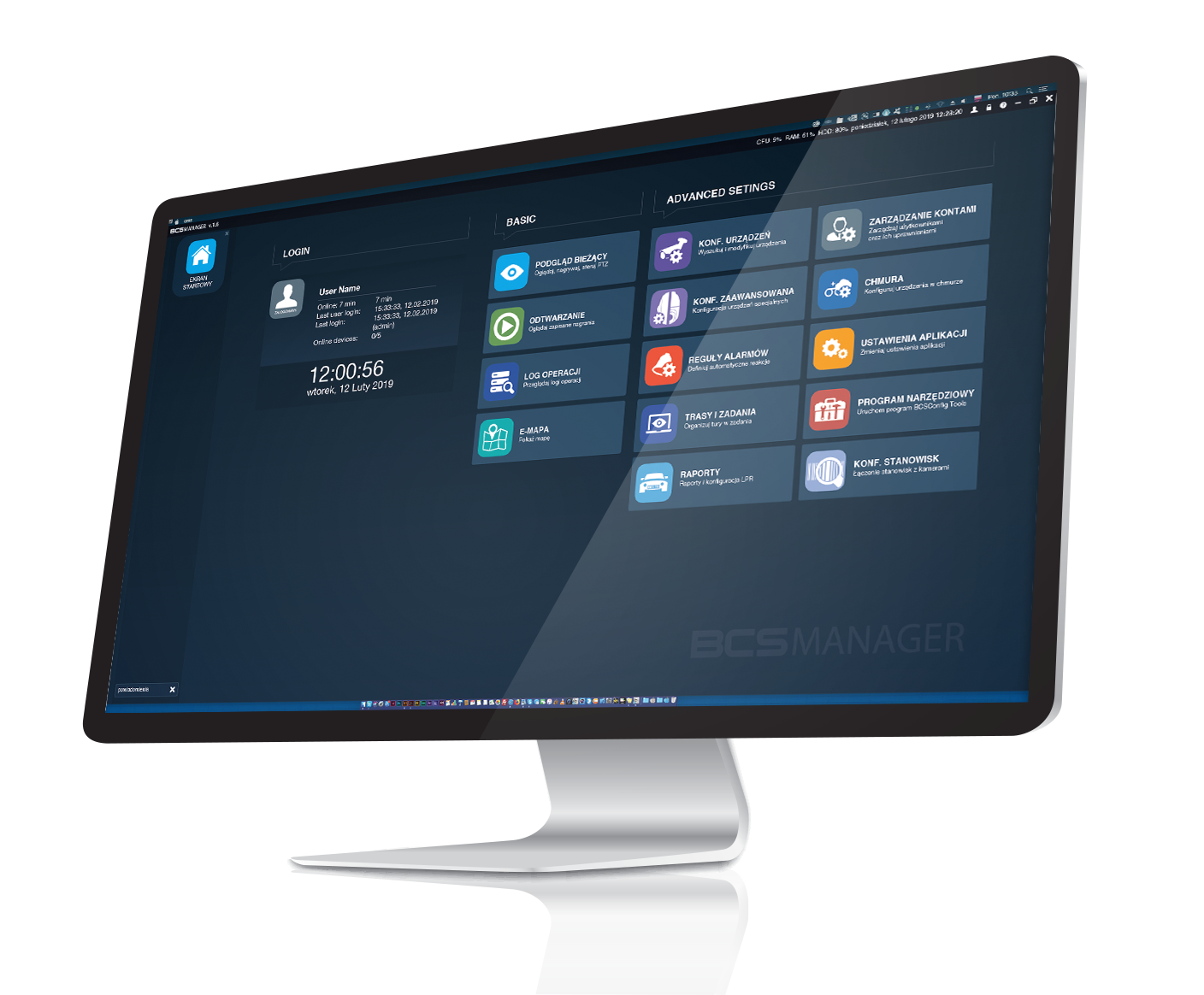
Application features and functions

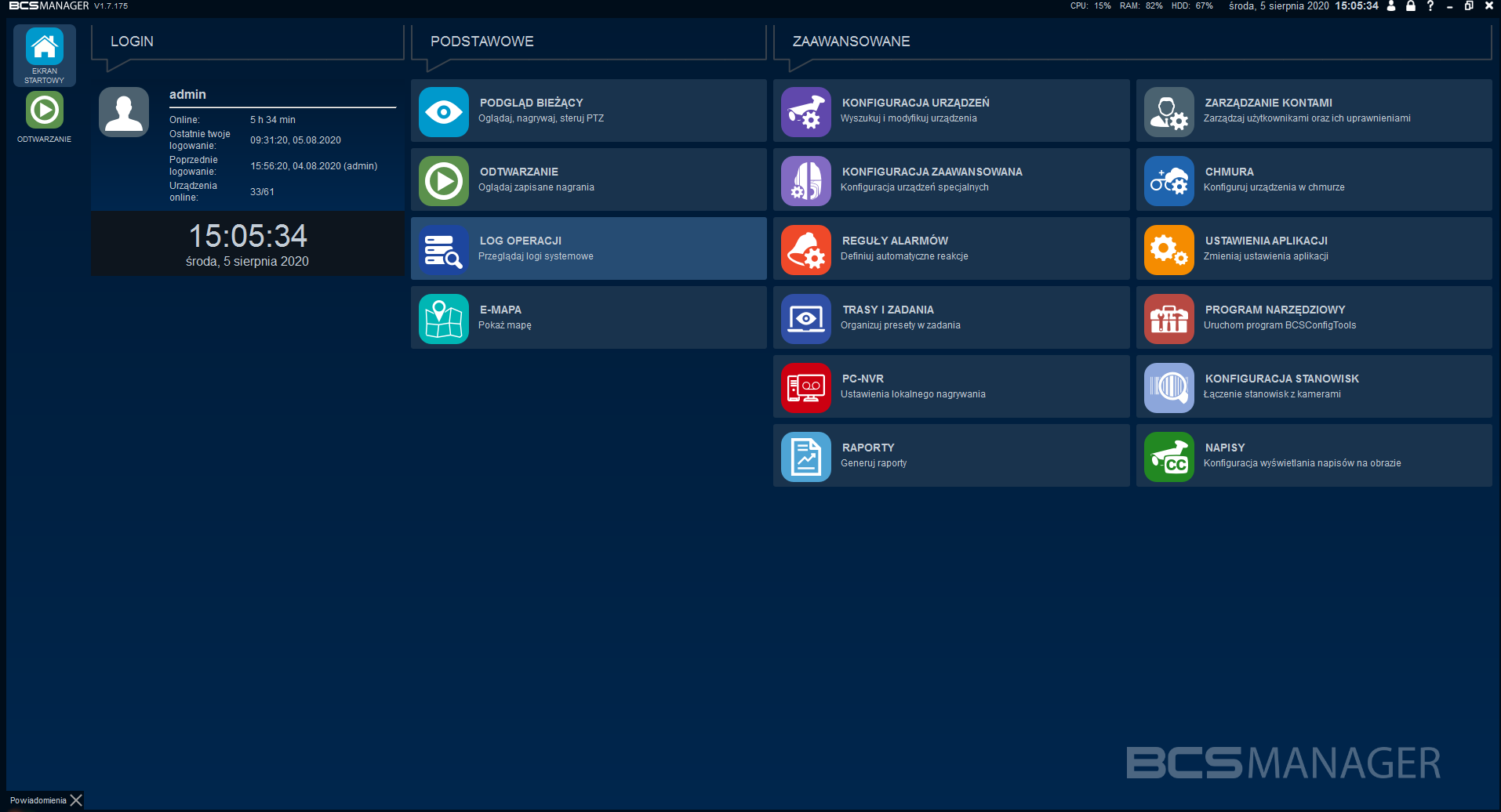
LIVE VIEW Watch, record, control PTZ
• predefined and custom layouts with view support, unlimited number of live view windows with possibility to detach and move to separate monitors;
• list of recorder channels, alarm inputs/outputs, device grouping, hiding disconnected devices/channels;
• editing/configuration of channel names, alarm inputs and outputs;
• video stream management tools, audio playback, two-way audio, quick playback, digital zoom, snapshot, local recording, alarm rule lines display, alarm output control;
• creating views with possibility to save 15 favorites;
• alarm queuing mode, automatic stream selection, automatic view mode, image proportions;
• synchronous quickplay; • control panels for special cameras such as Fisheye and PTZ;
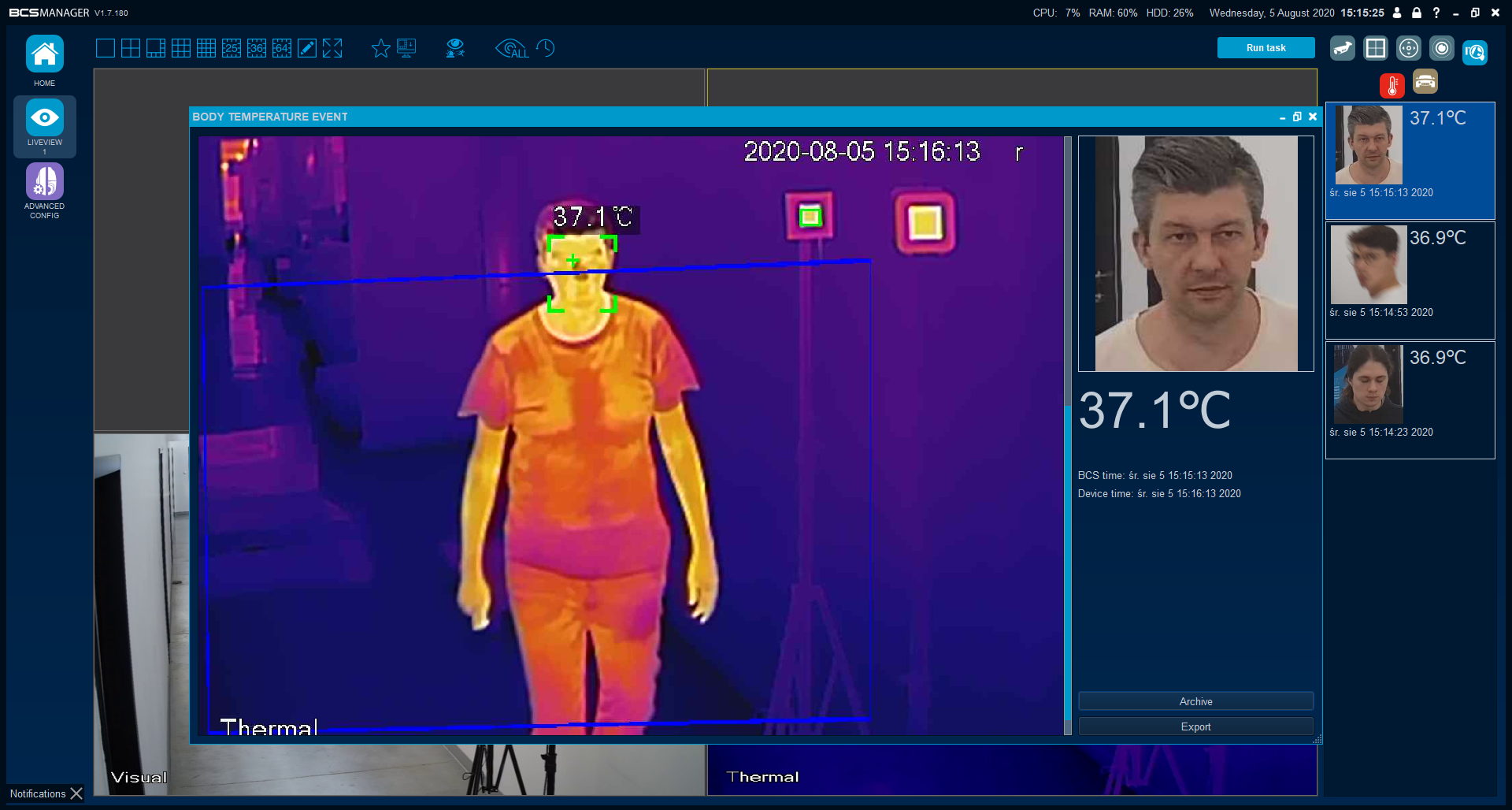
• IVS events list: license plate recognition and body temperature measurement;
• transition to recordings directly from view;
• restoring last view after application startup

PLAYBACK Watch saved recordings
• preview of video material recorded on recorder disk or locally on workstation;
• clear timeline with visual highlighting of events, synchronous playback, playback speed slower/faster;
• predefined and custom layouts;
• "dewarping" mode for recordings from fisheye cameras;
• downloading recordings from devices using scissors or bulk download;
• recording filter;
• calendar

OPERATION LOG Browse system logs
• logs containing information about system events, actions taken by user and alarms from devices received by application;
• interactive notifications

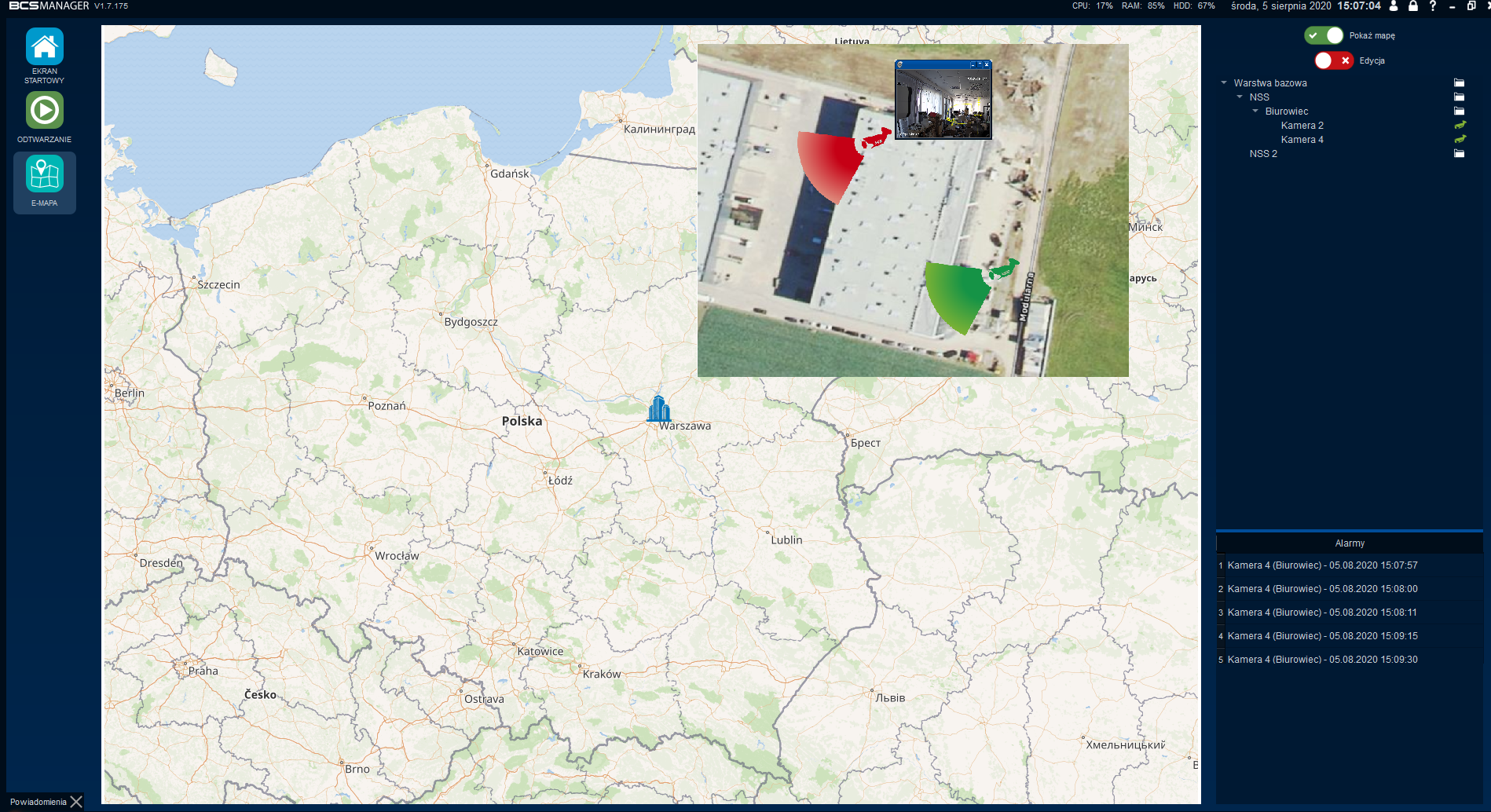
E-MAP Show map
• interactive world map with possibility to add any number of objects;
• for each object possibility to upload own background;
• organization of structure using layers;
• selection of camera type, observation direction, own names for layers and cameras;
• convenient view of alarms from all cameras in object;
• preview from camera directly from e-map layers, with full view functionality

DEVICE CONFIG Search and modify devices
• searching and adding CCTV devices in local network;
• manual adding of devices outside local network via IP address or domain;
• possibility to create device groups for easier identification and management;
• editing of added devices, simple moving between groups;

ADVANCED CONFIG Configuration of special devices
• identification of special cameras to unlock additional control functions;
• PTZ, will enable camera control via PTZ panel;
• FE, will enable image control in fisheye stream;
• LPR, will start vehicle monitoring module based on license plate recognition camera functions;
• Thermal, unlocks possibility of preview from thermal lens, enables reading events from body temperature measurement cameras (HBTM);
• linking special cameras (and not only) with recording devices, thanks to which recognized events can be reviewed in recordings;

ALARM RULES Define automatic reactions
• possibility to use camera and recorder functionalities to build alarm reactions;
• alarm sources: motion detection, camera covering, signal loss, intelligent alarms, alarm input, disk error or disk full;
• reactions to alarm source": show image, channel recording, taking photo or series of photos from channel, calling preset from PTZ camera or activating alarm output in recorder or camera;
• multimedia reactions in form of own graphics and sound, email notification;
• impossible to miss alarm reaction window, full functionality of stream toolbar;
• each alarm rule has its own reaction window

ROUTES AND TASKS Organize routes into tasks
• built from view sequences;
• possibility of automatic startup after user login;
• task in full screen;
• refreshes "lost" streams

PC-NVR Local recording settings
• stream maintenance;
• recording of main and/or extra stream, along with events;
• schedule for recordings;
• timed taking of photos or photo sequences;
• schedule for downloading recordings from devices;
• blocking recordings from overwriting with possibility to copy to USB media and delete

REPORTS Reports and LPR configuration
• generating reports from data collected based on readings from license plate recognition cameras and body temperature measurement;

ACCOUNT MANAGEMENT Manage users and their permissions
• creating/editing and deleting user accounts with conveniences such as password generator or preview of dotted password;
• defining access permissions to devices in scope of live view, playback and downloading recordings and controlling PTZ devices;
• defining permissions to individual application modules;
• defining permissions to copy and delete protected recordings and photos;
• creating templates that will fill desired permissions with one click during account creation or editing;
• possibility to assign task that will start after user login;
• guard function, thanks to which it is possible to monitor work of system operator;

CLOUD Configure devices in cloud
• application enables operation of devices added to BCS cloud account;
• BCS P2P cloud is ideal solution when network infrastructure and Internet access are limited at installation site

APPLICATION SETTINGS Change application settings
• settings concerning folders for recordings, photos and databases used by application;
• default settings for application functions such as visibility of unlogged channels, drawing IVS rules on camera image, restoring last view after application closing or displaying notifications;
• general settings for PC-NVR module such as recording folder size, pre and post alarm times for recorded events;
• default parameter settings for vehicle monitoring, body temperature measurement, video intercom modules;
• import/export of application configuration;
• operator control "guard" settings and report export;
• configuration of email accounts for sending messages with reports and recipient accounts;

TOOL PROGRAM Run BCSConfig Tools program
• searching for devices in local network;
• changing IP addressing in devices, also for multiple devices simultaneously;
• changing P2P server in devices;
• disk space calculator enabling calculation of approximate time or capacity values for recordings from cameras;

STATION CONFIG Connecting stations with cameras
• creating virtual station and assigning camera to it;
• calling recording from desired station based on defined date parameters, time range and considering specific events;

Subtitles Configuration of subtitle display on image
• displaying subtitles on screen along with video stream from camera;
• integrated POS support: Posnet, Forcom, Elzab, Novitus, (possible integration with any subtitle source);
• own settings for position, style, size and color of font for basic text and 3 highlighted text tabs;
• sound playback and/or alarm output activation after keyword appearance
• subtitles matched to played archive;
• browsing subtitles collected in database;
• sharing subtitle sources for other application instance
System requirements
(dependent on number of monitored devices)• For NVR system+4 cameras displayed in main stream:
• CPU: Intel i3 3rd generation or equivalent
• RAM: 4GB
• HDD: about 350MB
Catalog cards
We invite you to contact dedicated support for our BCS Manager Application.
Support operates from Monday to Friday from 9am to 5pm.
tel. 48 22 551 20 66
e-mail: e-mail
Want to obtain license for additional BCS Manager modules write to us at [email protected]
Description of licensed modules in application is in Price List and software features and functions.